|
Raymond Terrace Data |
Main Page View Temperature Form |
|
| |
| Weather Cam | |
| Data | |
| Latest Report | |
| Archive | Program Description |
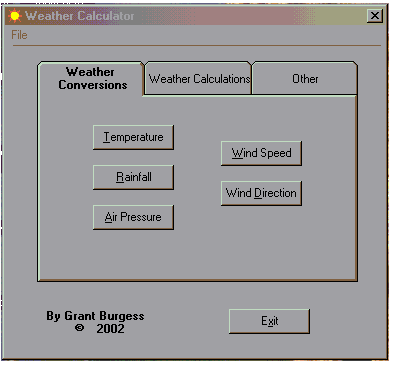
| * This is a conversion program that is able to take many different forms of the same parameter & output them all simultaneously for | |
| Full Yearly Summaries | ease of comparison. For example, Temperature has Celsius, Fahrenheit & Kelvin. |
| * This is also a calculator program where many useful weather calculations can be made, also with output's calculated | |
| Averages & Extremes | simultaneously. Various calculations include Humidity, Dew-Point & Wind Chill - these have their own separate sections. |
| * This program is designed to be used offline for your convenience. | |
| Photo Gallery | |
| Weather Calculator | This program is completely FREE to download, and no registration is required. Absolutely no malware or tracking software |
| is attached to this program - I know this because I am the sole author of the program! | |
| Links | |
| The only thing I ask is that all copies of my weather calculator be downloaded direct from this page. | |
| Barrington Tops | |
| If you have used this program successfully in the past then it may only be necessary to download the upgrade version. If not | |
| Home | or your not shore, I advise you download the full installer version. |
| Downloads here: | |
| Weather Calculator 3.01.zip (2.12 MB) - Full Version | |
| Weather Calculator 3.01ug.zip (127 KB) - Upgrade Version | |
| Brief Instructions | |
| - Download either of the "Weather Calculator *.**.zip" files to a known location | |
| - Using WinZip, unzip or extract the file to a known location | |
| - Open the "Weather Calculator.exe" file on your computer | |
| - Generally Windows98 or greater is required to run this program. | |
| WinZip - you can get it here: http://www.winzip.com/ | |
| ADDITIONAL DOWNLOAD for users of FreeWX | |
| * This spreadsheet is specifically designed to be used with the 'grafdata.dat' file. It offers an efficient way of making this data | |
| more legible. It can be used soon after any interesting weather event & offers analysis of both 1 & 10min intervals as well as | |
| several graphs. MS Excel is required for use of this spreadsheet. | |
| * It is important that these instructions be read fully & followed exactly in order not to unsettle FreeWX. | |
| 1. Without a doubt the most important step - please read fully before continuing! | |
| Copy the 'grafdata.dat' file & paste to a different folder. This should be done WITHOUT opening the file. For this you can | |
| either right click the file with your mouse & select copy, then select the desired folder & paste. You can also use 'CTRL C' | |
| & 'CTRL V' if you know what your doing. | |
| 2. Right click your copied 'grafdata.dat' file & select 'Open With' - 'MS Excel'. | |
| 3. Expand column A to have both the date & time visible. | |
| 4. For best results (with the 10min page), locate your starting time & make sure the mins part ends with a 0. | |
| 5. Copy your desired time frame & paste in cell A:1 of the spreadsheet file. | |
| 6. Now delete all unwanted rows of data from both the 1 & 10min pages - usually all the cells containing 0's. This should ensure | |
| all graphs look normal. | |
|
Data Template 1.03.zip (318 KB) - Updated 21/1/2008 | |